The CI1020 is a high-performance communication interface module engineered by ABB, specifically designed for industrial automation control systems. It serves as a robust gateway for seamless data exchange between field devices and the main control architecture. Renowned for its reliability and precision, the CI1020 facilitates real-time monitoring and high-speed communication, ensuring that complex industrial processes remain synchronized and efficient within demanding environments.
Technical Specifications
| Parameter | Specification |
| Model Name | CI1020 |
| Manufacturer | ABB |
| Product Category | Automation Control / Communication Module |
| Dimensions | 125 mm x 45 mm x 110 mm |
| Weight | 0.35 kg |
| Operating Temperature | -20°C to +60°C |
| Housing Material | Industrial Grade Composite |
| Country of Origin | Germany / Sweden |
Application Fields
The CI1020 is extensively utilized in sectors requiring stringent process control and network reliability. Its primary applications include power generation plants, chemical processing facilities, and large-scale manufacturing lines. It is particularly effective in distributed control systems (DCS) where high availability and fault tolerance are critical for maintaining system uptime and operational safety.
Operational Instructions
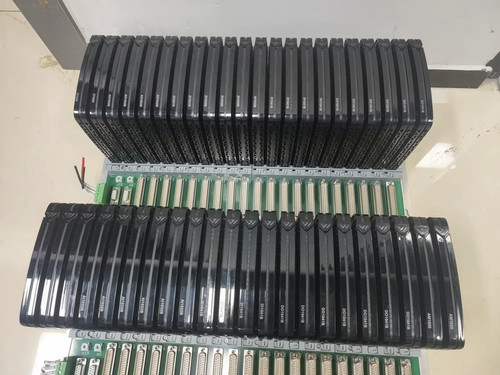
To deploy the CI1020 module, first ensure the power supply to the control rack is switched off to prevent electrical hazards. Slide the module into the designated slot on the backplane until the locking mechanism clicks into place. Connect the necessary communication cables, ensuring that shielding is properly grounded. Once physically installed, power on the system and access the ABB configuration software. Use the software interface to assign the device address and configure communication parameters to match the network topology. Verify the link status via the onboard LED indicators, which provide real-time feedback on transmission and power status.
Usage Precautions
Handle the module with care to avoid electrostatic discharge, which can damage internal circuitry. Always ensure that the operating environment complies with the specified temperature and humidity ratings to prevent component degradation. Do not attempt to open the module casing, as this will void the warranty and may compromise the electromagnetic shielding. When performing maintenance, ensure the power is isolated, and always use calibrated tools to tighten terminal screws to avoid stripping or loose connections that could lead to signal interference.
Common Questions and Answers
What is the primary function of the CI1020? Its main function is to act as a communication bridge within an ABB control system, allowing disparate field devices to communicate with the central processor. Does the module support hot-swapping? Generally, this depends on the specific backplane configuration and system safety protocols; however, it is standard practice to consult your system-specific manual before attempting to remove or insert the module while the system is energized. How do I troubleshoot a link failure? First, check the physical connections and ensure the cabling is intact. Next, observe the diagnostic LED patterns on the front panel and refer to the error codes in the configuration software to identify specific communication timeouts or addressing conflicts. Are there specific software requirements for this module? Yes, the CI1020 requires compatible ABB engineering software tools to perform configuration and firmware updates. Is firmware update necessary for this module? Firmware updates are recommended only when addressing specific compatibility issues or when advised by ABB technical support to enhance stability or add feature support.